Results Viewer


|
Results Viewer |
|
|
Standalone DesignBuilder Results Viewer The Results Viewer is a separate application which can be used to view EnergyPlus results stored in one or more .eso files. It can be downloaded from the main Downloads > Software area of the DesignBuilder website. When installed the application allows you to view any results contained within EnergyPlus .eso and .htm results files. There are 3 ways to open .eso results files:
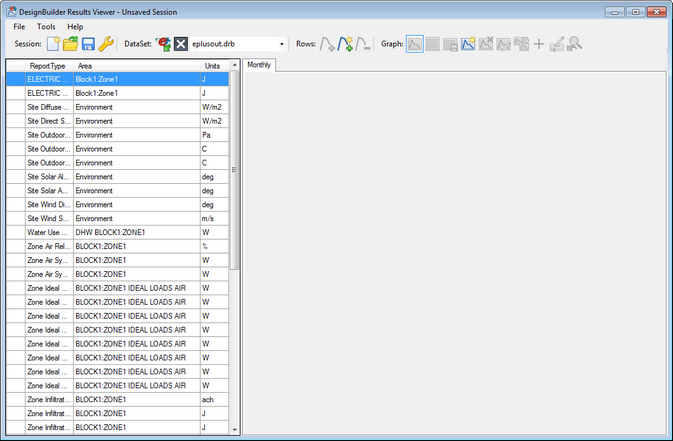
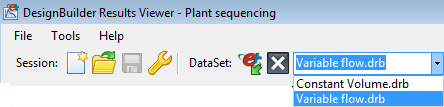
Multiple .eso and .htm files can be opened at a time. Use the combo box below the toolbar to select the current results set for plotting. With an .eso file open the first view will be something like that shown below.
DISPLAY RESULTS To show results for a particular interval use the Frequency drop list to select the interval. Sorting the Reports can be a useful way to help find particular data and can be achieved by clicking on the column headers. For example to see data sorted by "Area" click on the Area header. This will collect together all data for each zone, HVAC component, Environment etc. in the list. To plot a report on a graph use one of these methods:
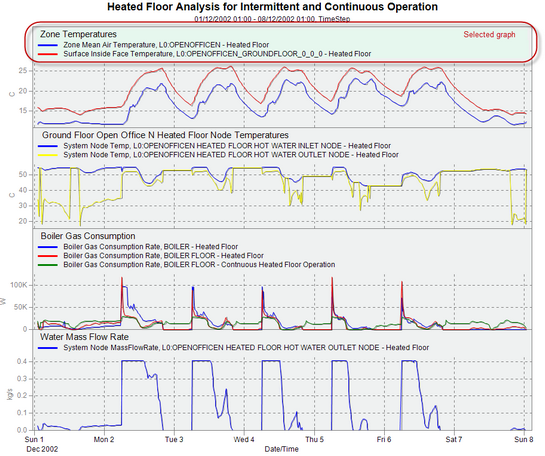
Selecting a graph If you have more than 1 graph set up you can select the current graph simply by clicking on it. You will see the graph heating highlight in a different blue when selected as shown below.
MENU COMMANDS You can access a range of options from the top bar menu, toolbar and right-click context menus. These are as follows: Display grid Display the data as a grid instead of a graph. Display graph Display the data as a graph instead of a grid. Save grid to CSV Allows you to save the data as a comma separated values file for loading into a spreadsheet for further analysis. Copy graphs to another frequency If you have generated similar data for multiple frequencies then use this tool to use settings for the current frequency and display the same reports using a different frequency. Change main title Change the text to be used for the main title for all graphs Rename graph title Allows you to change the title for the currently selected graph. To change the name of the current graph right-click on the graph and from the DesignBuilder Options, select the Rename graph title option. Enter the title for the graph in the dialog and press OK. Remove selected graph Deletes the current graph. Any data displayed in the graph is unaffected. Cross hair on/off Checking this option displayed a cross hair which allows you to create a vertical and horizontal line when you click on a data point. It can be useful to check simultaneous values for a range of reports. Template Load/Save When you create graphs with Results Viewer, they are styled (e.g. Title Font, Background colour, etc) using a default styling template. You can change the styling defaults to your own preferences by using the right-hand context menu on the graph pane. The following options are currently available:
If you make some changes and want to revert back to the default styling at any time, select the Tools > Restore Graph Styling menu option. Any styling changes made to the currently open session will be made permanent once the session has been saved. If you wish to reuse your styling changes, you can save these to a styling template file and apply them to other sessions. Use the Tools> Template > Save option to save your styling template as a standalone file, ie outside of the session (note: the '.drt' file extension is used for styling template files). The Tools > Template > Load option can then be used to apply this style to another session. LOADING MULTIPLE DATA SETS You can load as many data sets as required to a single Results Viewer session by using the Open eso/Dataset menu or toolbar option. A list is maintained of all data sets currently opened in the drop list at the top of the window.
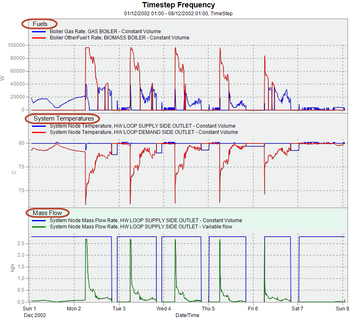
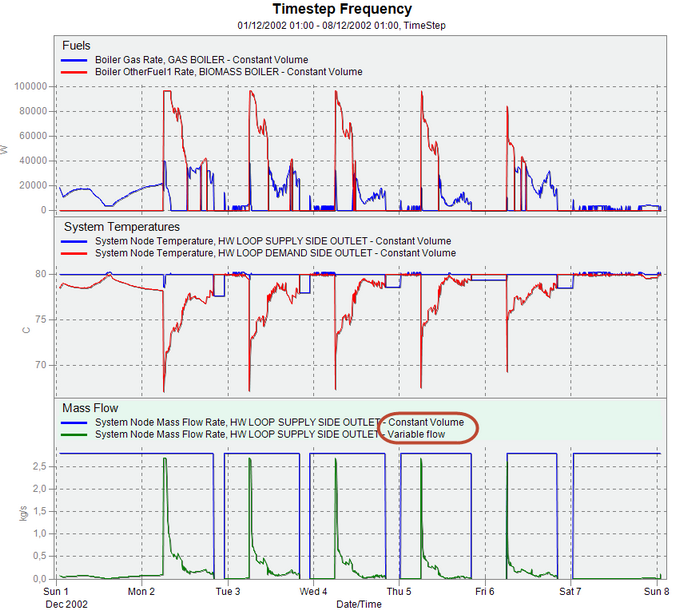
When you have more than one data set open it usually helps to Include the dataset name in the legend. This can be done from the Options dialog. OPTIONS DIALOG The Options dialog is accessed either from the toolbar Autosave session Select this option if you would like the session to be saved automatically when closing the Results Viewer. Display a title for each graph Selecting this option causes the title of each graph to be displayed for each graph as shown in highlighted areas in the graph below.
To change the name of the current graph right-click on the graph and from the DesignBuilder Options, select the Rename graph title option. Enter the title for the graph in the dialog and press OK. Include dataset name in legend If you have more than one data set loaded then you should usually select this option to ensure that the data set name is included in the legend. This can help when comparing results for different simulations.
The output above shows how the dataset name is added to each legend. Include folder name in dataset name If you include the dataset name in the legend then do you want the folder name included too? If so check this option. This option is only usually used when the result sets are stored in files with the same name but in different folders. ZOOMING In some cases you may find that too much data is displayed on the X-axis at one time and you need to focus on a section (time period) of the results graph. You can use the mouse to do this simply by dragging a time region of interest. This allows you to zoom in on data for particular days. To return back to the original "un-zoomed" state, use the Undo zoom toolbar option. SESSIONS It can take some time to load.eso files and to select results so DesignBuilder provides methods to save pre-processed results files and session files to speed loading and setting up reports the next time. .drb results files When the Results Viewer loads an .eso file it automatically generates a .drb file with exactly the same data but in a form that can be loaded much more quickly. If you need to view the results again in future you can open the drb file instead of the .eso file. The .drb file will have the same filename as the original .eso file (apart from the extension). It does not contain any display settings - just the data. .drs results files You can also save a session file which stores all of your display settings for a graphing session as well as the corresponding .drb file(s). Opening the session file will take you back to where you were before saving the session file. Session files provide a very useful way to package up all data and settings for a Results Viewer session in a small file size. They can be sent to colleagues for viewing. You can configure DesignBuilder to save.eso files in various ways as described for the EnergyPlus tab of the Program options. If you plan to use the Results Viewer in favour of the inbuilt DesignBuilder results display then you might use one of the settings configurations below:
Mario Kart 8 Deluxe ◆ ❲QUICK❳For Mario Kart 8 Deluxe, there isn't a single physical "piece" included with the game, but several official and third-party accessories are commonly referred to as essential "pieces" for the experience: Official Nintendo Accessories Nintendo Nintendo Switch Joy-Con Wheel Pair THB 320.88($9.99) Play-Asia.com& more Go to product viewer dialog for this item. A set of two plastic steering wheel shells that you slide your Joy-Cons into. These are designed to make motion steering more intuitive and provide easier access to the SL and SR shoulder buttons. Hori Mario Kart 8 Deluxe Racing Wheel for Nintendo Switch THB 540.00 Play-Asia.com& more Go to product viewer dialog for this item. A larger, more premium wheel attachment manufactured by HORI and officially licensed by Nintendo. It features rubberized grips and oversized shoulder buttons for better control. These physical "pieces" can be scanned to unlock exclusive Mii Racing Suits themed after characters like Mario, Link, or Samus. Replacement and Spare Parts If you are looking for a specific replacement part for a physical copy: Replacement Game Case: Authentic or high-quality replacement cases and cover art are available if your original box is damaged. Replacement Cartridge Labels: Custom replacement labels can be found for cartridges with peeling or missing stickers. In-Game "Pieces" (Customization) In the game itself, you build your vehicle using three primary "pieces": Karts/Bikes: The main body of your vehicle, affecting speed and weight. Tires: These impact traction and acceleration. Gliders: These determine how your vehicle handles in the air. The Joy-Con Wheel: Is It Any Good? Mario Kart 8 Deluxe is the ultimate edition of Nintendo’s acclaimed kart racer, originally released for the Nintendo Switch on April 28, 2017 . It serves as an enhanced port of the Wii U's Mario Kart 8, featuring all original DLC, an overhauled Battle Mode, and a massive roster of over 42 characters Key Game Features Massive Content Library : Includes every track and character from the Wii U original and its DLC packs, plus new additions like the Inklings from Dual Item Slots : Unlike the original version, players can now carry two items at once , adding a deeper layer of strategy to races. Improved Battle Mode : Features dedicated arenas (rather than just repurposed race tracks) and five distinct modes: Balloon Battle Renegade Roundup Bob-omb Blast Coin Runners Shine Thief Accessibility Options : Introduces Smart Steering Auto-accelerate , making the game accessible for toddlers and new players while remaining challenging for veterans. Enhanced Performance : Runs at a crisp 1080p resolution and 60 FPS in docked mode, providing a visual upgrade over the 720p Wii U version. Strategic Gameplay Elements Beginner Basics for Mario Kart 8 Deluxe - Nintendo Mario Kart 8 Deluxe remains the undisputed heavyweight champion of kart racing, nearly a decade after its initial release on the Nintendo Switch. Even with the 2025 launch of Mario Kart World for the Nintendo Switch 2, Deluxe continues to dominate sales charts and online lobbies, recently crossing a staggering 70.59 million units sold. The Ultimate Racing Package What began as an enhanced port of the 2014 Wii U title has evolved into the most comprehensive racing experience in Nintendo’s history. The "Deluxe" moniker isn't just marketing; the game includes all original DLC from the Wii U era and a completely overhauled Battle Mode with five distinct game types and dedicated arenas—a major improvement over the original's track-based battles. Mario Kart 8 Deluxe Mario Kart 8 Deluxe: The Ultimate Racing Experience Released in 2017 for the Nintendo Switch, Mario Kart 8 Deluxe is an enhanced version of the 2014 Wii U game, Mario Kart 8. This popular kart racing game has been a favorite among gamers of all ages, and its deluxe version offers even more excitement and fun. Gameplay In Mario Kart 8 Deluxe, players can choose from a variety of iconic Nintendo characters, including Mario, Luigi, Princess Peach, and Bowser. The gameplay involves racing karts on different tracks, collecting power-ups, and using items to gain an advantage over opponents. The game features various modes, including Grand Prix, Time Trial, and Multiplayer. New Features The deluxe version of Mario Kart 8 includes several new features, such as:
Graphics and Sound The game boasts stunning graphics, with detailed tracks, characters, and effects. The sound design is also impressive, featuring iconic music and realistic sound effects. Multiplayer Mario Kart 8 Deluxe offers a variety of multiplayer options, including:
Reception Mario Kart 8 Deluxe received widespread critical acclaim, with praise for its:
Conclusion Mario Kart 8 Deluxe is an excellent racing game that offers a fun and exciting experience for players of all ages. With its variety of modes, new features, and stunning graphics, it's a must-have game for Nintendo Switch owners. Key Features:
Rating: 4.5/5 stars Recommendation: If you're a fan of kart racing games or Nintendo, Mario Kart 8 Deluxe is an excellent choice. It's also a great game to play with friends and family, either locally or online. For Mario Kart 8 Deluxe , there isn't Mario Kart 8 Deluxe is an enhanced port of the 2014 Wii U title, released for the Nintendo Switch on April 28, 2017. It is currently the top-selling game on the Nintendo Switch system, with over 70 million units sold as of 2026. Key Gameplay Features Anti-Gravity Racing: Players drive on walls and ceilings in dedicated "anti-gravity zones." Colliding with opponents or blue "Spin Boost" objects in these zones grants a speed boost. Dual Item Wielding: Unlike the original Wii U version, players can now carry two items at once, similar to Mario Kart: Double Dash!!. Revamped Battle Mode: Includes classic modes like Balloon Battle and Bob-omb Blast, with eight dedicated battle courses instead of the repurposed race tracks used in the original. Smart Steering: A new accessibility feature that helps beginners stay on the track, making the game more approachable for younger players. Content and Roster Mario Kart 8 Deluxe - Full Game (All 96 Tracks 4K) The Evolution of a Masterpiece: Mario Kart 8 Deluxe Mario Kart 8 Deluxe stands as the definitive kart racing experience, seamlessly blending high-speed competition with a whimsical cast of characters. Originally a Wii U title released in 2014, the "Deluxe" version for the Nintendo Switch has become one of the best-selling video games of all time. Its success is rooted in its accessible yet deep gameplay mechanics, stunning visual design, and a massive library of content that spans decades of Nintendo history. Core Gameplay and Innovation The central innovation of Mario Kart 8 is its anti-gravity mechanic. Certain sections of the track allow karts to drive on walls or ceilings, transforming the racing field into a three-dimensional playground. While in anti-gravity mode, colliding with other racers or specific bumpers provides a "Spin Boost," rewarding aggressive driving with extra speed. The "Deluxe" edition introduced several critical quality-of-life improvements: Dual Item Slots: Players can now hold two items at once, increasing strategic depth during races. Smart Steering: An optional feature for beginners that prevents the kart from falling off the track, making the game accessible to even the youngest players. Battle Mode Overhaul: Unlike the original's track-based battles, Deluxe reintroduced dedicated battle arenas and various modes like Balloon Battle, Renegade Roundup, and Shine Thief. A Content Powerhouse At launch, Mario Kart 8 Deluxe included all 48 tracks from the original game and its DLC. However, the game's longevity was cemented by the Booster Course Pass, a paid expansion that doubled the track count to 96 courses. This collection includes remastered favorites from older consoles—like Mario Kart Wii and Mario Kart Double Dash!!—alongside mobile tracks from Mario Kart Tour. The roster is equally expansive, featuring 42 characters including guest stars like the Inklings from Splatoon, Link from The Legend of Zelda, and Isabelle from Animal Crossing. Visuals and Soundscape The game is widely praised for its vibrant art style and orchestral soundtrack. In a shift for the series, much of the music was recorded by a live jazz band, placing jazz at the center of the game's identity. This high production value ensures that every race feels like a grand spectacle, whether played on a handheld screen or a large television. Conclusion Mario Kart 8 Deluxe is more than just a port of an older game; it is a celebration of Nintendo's racing legacy. By combining polished mechanics, an unprecedented amount of content, and accessible design, it has secured its place as a staple of social gaming. Whether competing in a local tournament or playing online with friends across the globe, it remains the gold standard for the genre. Mario Kart 8 Deluxe - All 96 Tracks With Booster Course Pass Trailer New Characters : The game introduces new characters, Mario Kart 8 Deluxe : The Definitive Evolution of Kart Racing Originally launched on the Wii U in 2014, Mario Kart 8 found its ultimate form on the Nintendo Switch as Mario Kart 8 Deluxe in April 2017. It has since become the best-selling game on the Nintendo Switch with over 70 million units sold, cementing its place as one of the most successful video games of all time. 1. Key Improvements Over the Wii U Version The Deluxe edition isn't just a port; it introduces critical gameplay and technical refinements: Here’s a concise write-up for Mario Kart 8 Deluxe: Mario Kart 8 Deluxe is the definitive version of the acclaimed Wii U racer, revamped and expanded exclusively for the Nintendo Switch. Released in 2017 as a launch-window title, it quickly became a system seller and remains one of the most beloved multiplayer games on the platform. What’s Inside: Gameplay Highlights:
Multiplayer & Modes:
Performance & Presentation: Why It Endures: Verdict: Rating: 9.5/10 Here’s a complete content idea for Mario Kart 8 Deluxe, structured for a YouTube video, TikTok/Reel, or blog post. The Characters: Everyone Is Here (Almost)With updates and DLC, the character roster swelled to over 40 drivers. You have the standard crew (Mario, Luigi, Peach, Bowser) alongside deep cuts.
Crucially, Deluxe removed the bizarre weight-class restrictions of previous games. You can now put any combination of wheels, gliders, and karts on any character. The meta has settled (Waluigi on the Wiggler kart with Roller tires is famously broken), but for casual players, creating a Frankenstein monster of a kart is half the fun. 1. Handheld Mode (Tablet)This is where the game shines for solo players. The 60fps frame rate holds steady even on the original Switch screen. Completing all Grand Prix cups to unlock Gold Mario is a perfect airplane companion. Topic: "The Most Broken Combo You’re Not Using (Yet)"
|
 or from the Tools top menu option.