
Защищенные мини ПК
Каждая модель PC4U имеет возможность применять наложенные средства защиты информации. Используется аппаратный модуль доверенной загрузки и аутентификации СЗИ Инспектор.
Персональный компьютер PC4U может использоваться для индивидуального домашнего и промышленного использования в коммерческих, государственных и образовательных учреждениях, там, где необходимы электронные вычисления и обработка информации.
Модельный ряд PC4U имеет системные блоки компактного размера и малого веса, что позволит не занимать много места на вашем рабочем столе. Забудьте о громоздких персональных компьютерах их эра уже заканчивается!
Модели PC4U на пассивном охлаждении имеет революционную систему пассивного охлаждения, которая обеспечит Вам комфортную работу в полной тишине.
Энергоэффективные модели PC4U имеют очень низкое энергопотребление, порядка 10 - 15 Вт/ч, что в 15 раз меньше, по сравнению с обычным персональным компьютером.
Модели PC4U построены на комплектующих последнего поколения, что позволяет с комфортом работать с графическими, вычислительными и ресурсоемкими приложениями.
При использовании энергоэффективного персонального компьютера PC4U срок окупаемости составляет 2,5 года благодаря экономии электроэнергии.
Благодаря отсутствию движущихся деталей, которые являются основным фактором выхода из строя персонального компьютера, срок службы PC4U С пассивным охлаждением составляет более 7 лет.
Модели PC4U зарекомендовали себя стабильной и эффективной работы.
Применяется собственная, запатентованная технология пассивного охлаждения.
Государственные учереждения могут приобрести модели PC4U из одного источника.
Каждая модель PC4U имеет возможность применять наложенные средства защиты информации. Используется аппаратный модуль доверенной загрузки и аутентификации СЗИ Инспектор.
Персональный компьютер PC4U предназначен для работы во многих сферах деятельности, начиная от домашнего использования и заканчивая применением в промышленных задачах.
Коммерция
Производство
Силовые структуры
Авиация
Недропользователи
Здравоохранение
Банки
Учебные заведения
Терминалы
Банкоматы
Информационные киоски
АСКУЭ
Выберите модель, которая соответствует вашим задачам
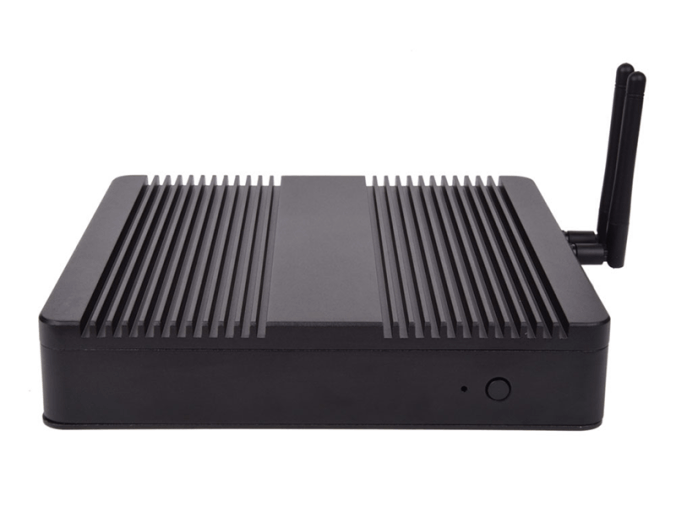
CPU: i3 6100u/7100u, i5 6200u/7200u
RAM: 2 - 16 Gb
HDD: 500 Gb - 4 Tb
SSD: 120 Gb - 1Tb
Крепление VESA
Пассивное охлаждение
Габариты: 198х198х40 мм
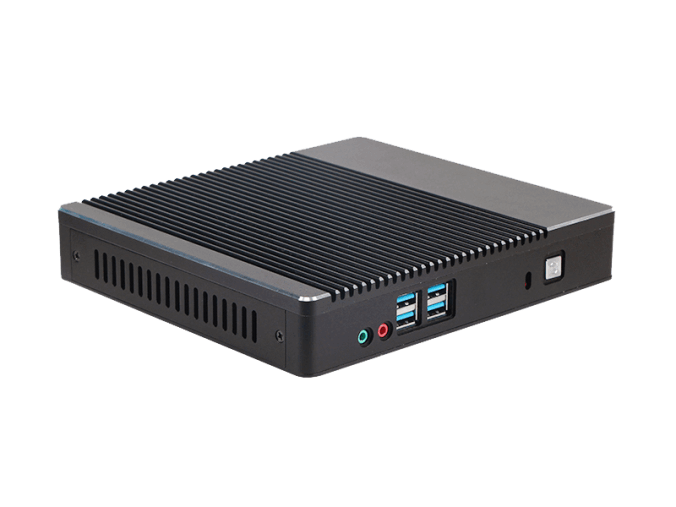
CPU: Intel Celeron, i3, i5, i7; AMD
RAM: 2 - 16 Gb
HDD: 500 Gb - 4 Tb
SSD: 120 Gb - 1Tb
Kensington Lock
Пассивное охлаждение
Габариты: 198х179х35 мм
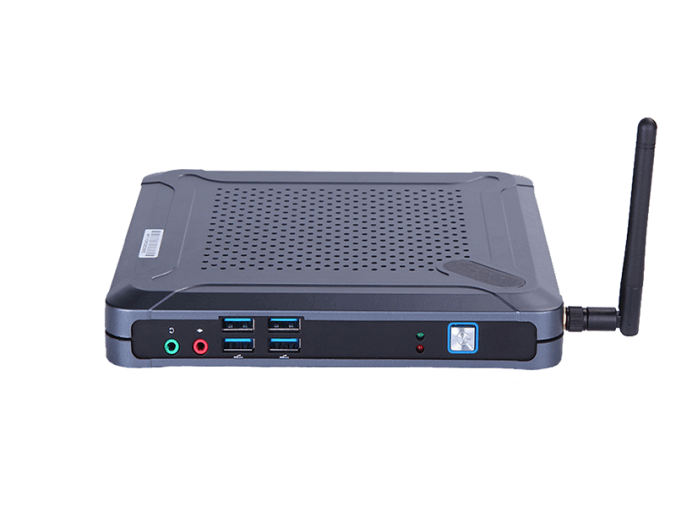
CPU: Intel Celeron, i3, i5, i7; AMD
RAM: 2 - 16 Gb
HDD: 500 Gb - 4 Tb
SSD: 120 Gb - 1Tb
Крепление на монитор
Габариты: 175х185х25 мм
Выберите модель, которая соответствует вашим задачам
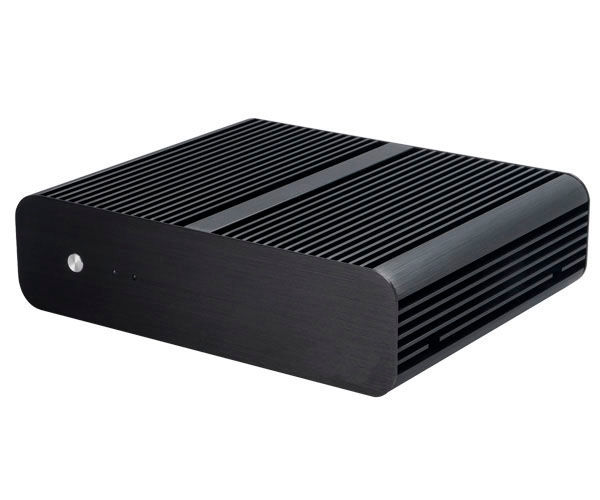
CPU: Intel Celeron, i3, i5, i7; AMD
RAM: 2 - 16 Gb
HDD: 500 Gb - 4 Tb
SSD: 120 Gb - 1Tb
Пассивное охлаждение
Габариты: 228х187х61,5 мм
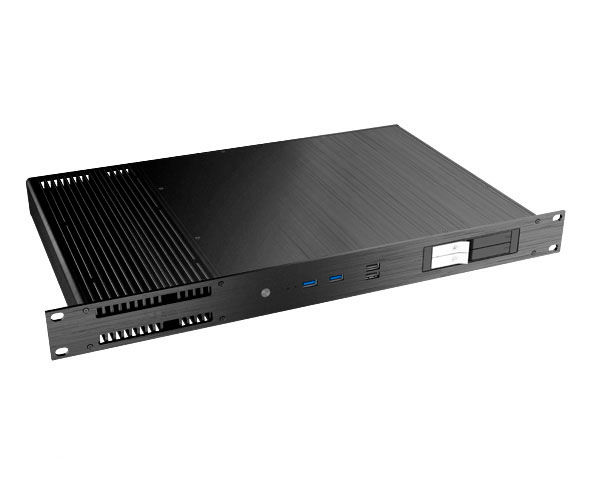
CPU: Intel Celeron, i3, i5, i7; AMD
RAM: 2 - 16 Gb
HDD: 500 Gb - 4 Tb
SSD: 120 Gb - 1Tb
Пассивное охлаждение
Kensington Lock
Крепление VESA
Габариты: 482,6х278х43,6 мм
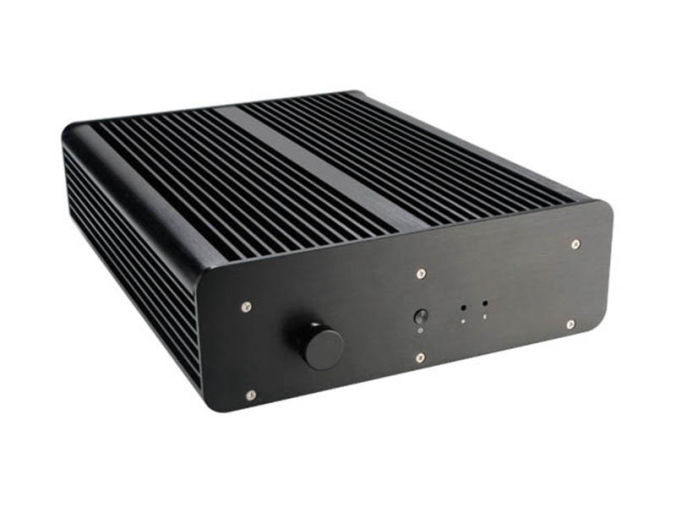
CPU: Intel Celeron, i3, i5, i7; AMD
RAM: 2 - 16 Gb
HDD: 500 Gb - 4 Tb
SSD: 120 Gb - 1Tb
Пыле - влагозащищенный
Пассивное охлаждение
Габариты: 235х308х76 мм
Выберите модель, которая соответствует вашим задачам
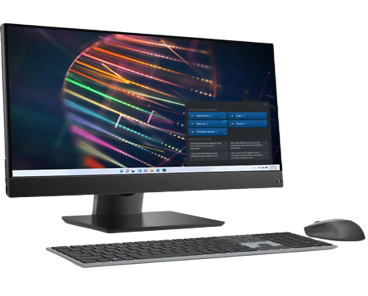
CPU: 4 ядерный процессор 11-го поколения; Тактовая частота/макс. тактовая частота 2.8/4.7GHz; Литография процессора 10hm; Кеш-память 12МБ;
RAM: тип памяти DDR4; Объем оперативной памяти 16Гб;
SSD: Объем твердотельного накопителя 512Гб;
Дисплей: Дисплей: 23.8" Разрешение Full HD 1080p (1920x1080), Антибликовое покрытие;
Особенности: Cетевой контроллер - 10/100/1000 Mb/s,
cтандарт Wi-Fi 802.11ac,
оптический привод DVD+R/RW&CD-R/RW,
звук встроенные динамики, встроенный микрофон,
встроенный виодеоадаптер, средства коммуникации LAN, WiFi, Bluetooth,
веб-камера, порты USB 2.0 - 1шт, порты USB 3.1 Gen 1-4шт,
блок питания 90Вт;
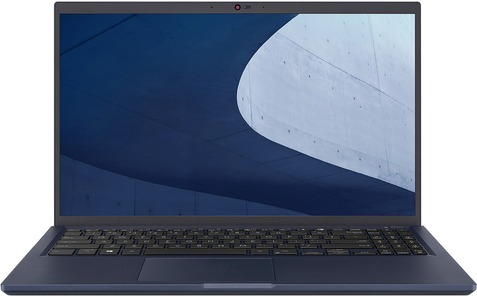
Артикул: 487PC01E
CPU: Pentium Gold/7505/2GHz
RAM:8Gb
HDD:-
SSD: M.2 PCIe 256Gb
Screen: 15,6"/1920x1080 full HD
Graphics: intel UHD/256mb
OC: Windows 10/Home
Габариты: 358x237x19 мм
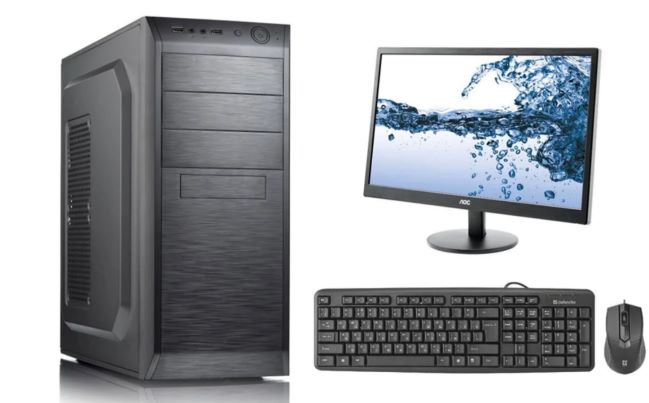
CPU: Процессор и частота процессора 12-го
поколения со встроенным
графическим адаптером
UHD-графика Intel 770
(тактовая частота 3,0 ГГц с
возможностью увеличения
до 4,6 ГГц, 18 Мбайт кэш памяти, 6 ядра, 12 потоков),
TDP не ниже 65W
RAM:8 ГБ DDR4 – 3200MHz
Hard drive: SSD 256GB M.2 PCIeNVMe, HDD 500GB 7200 RPM 2.5in
Монитор: Тип дисплея Матрица IPS со светодиодной подсветкой, входной сигнал Порт HDMI (HDCP 1.2), порт DisplayPort 1.2 , VGA
Диагональ (27 дюйма)
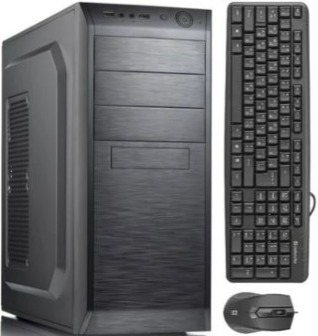
Описание тех. характеристик:
Процессор:Intel Core i5-12600K LGA1700, cash 20M, 2.80/3.70 GHz, 10(4+6)/16 Core Alder Lake, 125 (150) Вт;
Описание тех. характеристик:
Процессор:Intel i5-12600K LGA1700, 125(150)Вт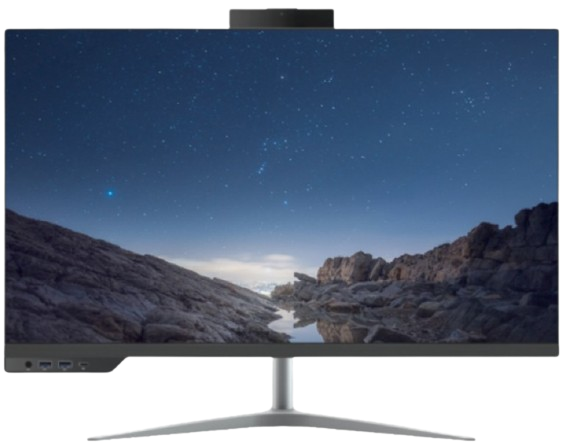
Описание тех. характеристик:
Процессор: i5-12400 LGA1700, оем, 18M, 2.50 GHz, 6/12 Core Alder Lake, 65 (117) Вт, UHD730;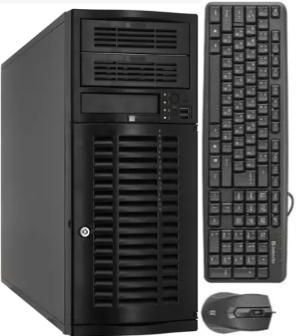
Описание тех. характеристик:
Процессор: Intel Xeon Processor W-2225 (4C 4.1GHz 4.6GHz Turbo HT 8.25MB 105W DDR4-2933)
Процессор:Core i7-13700 (8+8 Cores/30MB/24T/2.1GHz to 5.1GHz/65W)
Модуль памяти:16GB (1X16GB) DDR5 Non-ECC Memory
SSD: M.2 2230 256GB PCIe NVMe
Операционная система:Windows 11pro;
Дисплей: 23.8" FHD 1920X1080 Non Touch, 65W CPU, HDMI, FHD Camera, UMA, 160W Bronze PSU, WW;
Особенности: Intel Wi-Fi 6E (6GHz) AX211 2x2 Bluetooth 5.2 Wireless Card, Wireless Driver, Intel WiFi 6E AX211 2x2 (Gig+) + Bluetooth 5, Waves Maxx Audio
Комплект:Беспроводная стандартная клавиатура, беспроводная мышь, гарнитура;
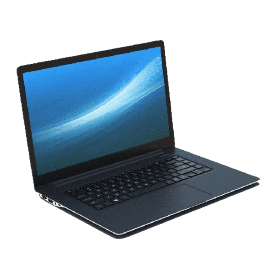
Процессор:13th Gen Intel® Core™ i7-1355U (12 MB cache, 10 cores, 12 threads, up to 5.00 GHz)
Оперативаня память:16GB, 8GBx2, DDR4, 2666MHz
SSD:512GB M.2 PCIe NVMe Solid State Drive
Экран: 15.6 inch FHD (1920 x 1080) 120Hz, матрица WVA
Графика: Intel(R) Iris(R) Xe Graphics
Oперационная система: Windows 11 Pro, English, Arabic, French, Russian, Turkish
Комплект: беспроводная мышь, сумка, зарядное устройство
Процессор:13th Generation Intel(R) Core(TM) i5-1335U (12 MB cache, 10 cores, up to 4.6 GHz)
Оперативная память:8 GB, 1 x 8 GB, DDR4, 3200 MT/s, single-channel, Non-ECC
SSD:M.2 2230 PCIe NVMe Gen4x4 256GB SSD Class 35
Экран:15.6" FHD (1920x1080) Non-Touch, AG, IPS, 250 nits, FHD Cam, WLAN
Графика:Встроенное графическое ядро;
Операционная система:Windows 11 Pro, English, Arabic, French, Russian, Turkish
Комплект:беспроводная мышь, сумка, зарядное устройство
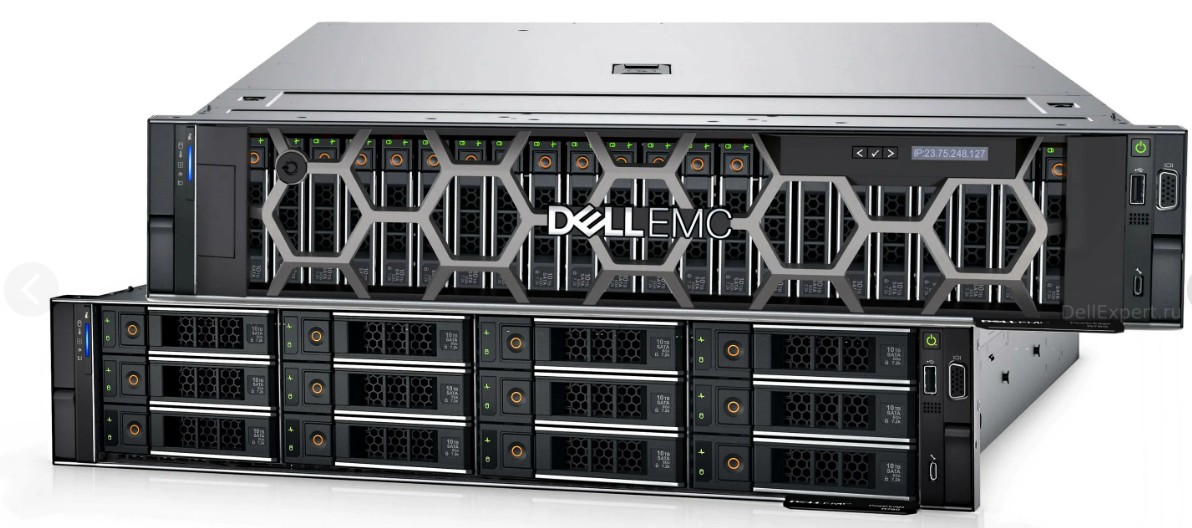
Процессор:Intel Xeon Gold 6326 2.9G, 16C/32T, 11.2GT/s, 24M Cache, Turbo, HT (185W)
Оперативная память:DDR4-3200 128 GB RDIMM, 3200MT/s
SSD:960GB SSD SATA Mix Use 6Gbps 512 2.5in Hot-plug AG Drive, 3 DWPD - 16 шт
Дополнительно:Dual, Hot-Plug, Power Supply, 1100W MM (100-240Vac) Titanium, Redundant (1+1) - 2шт
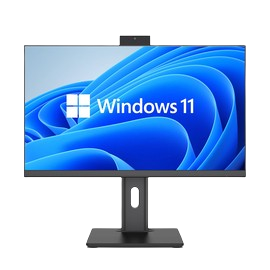
Процессор:Core i7-12650H
Модуль памяти:16GB, DDR4 3200MHz
SSD: 1TB NVMe PCIe Gen 3
Операционная система:Windows 11pro 64 Russian;
Дисплей: 23.8-27" 2560x1440 IPS
Порты: 5х USB3.1 Gen1 с поддержкой технологии подачи питания,1x RJ45, 1x DP-in или 1x DP-out; 1x HDMI; 1x USB 3.1 Type-C Gen1; 1x совмещенный порт микрофон/наушники (3,5 мм),универсальный аудиоразъем с CTIA
Особенности:Cлот для замка безопасности, Система физической безопасности корпуса, Bluetooth, Wifi, Камера.
Комплект: USB стандартная клавиатура и USB мышь, блок питание.
ㅤㅤ
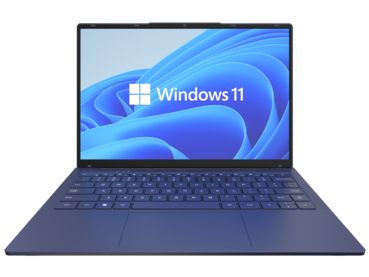
Процессор:Core i7-12 поколения
Оперативаня память:16GB, DDR4 3200MHz
SSD:1TB NVMe PCIe Gen 3
Экран: 14-15.6 FHD IPS (1920 x 1080)
Графика: Встроенная
Порты:Порты: 2x USB 3.1 Gen1; 1x USB 3.1 Type-C Gen2 (с поддержкой DP и подачи питания); 1xHDMI; 1x RJ45;
Особенности:крепления для защиты
устройства. Wifi, Bluetooth, антибликовое покрытие, гигабитный сетевой контроллер, камера
Oперационная система: Windows 11 Pro 64 Russian
ㅤㅤ
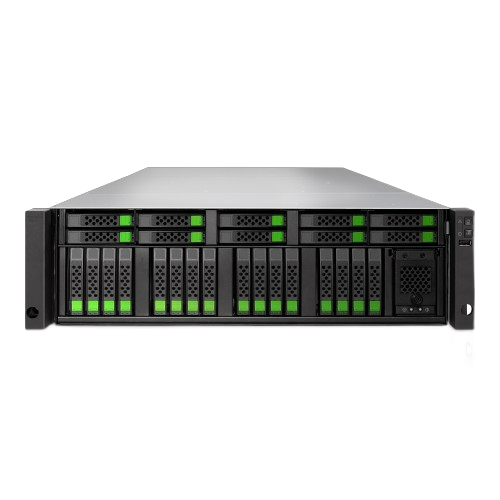
Тех. характеристики:Двухконтроллерная система All-NVMe flash, 64-разрядный 6-ядерный процессор Intel Xeon, 32 ГБ ОЗУ по умолчанию (МАКС. 768 ГБ ОЗУ), 4 порта SFP+ по 10 Гбит/с, резервный источник питания, 4 слота для дополнительных хост-карт (слот 1 и слот 2: дополнительные хост-карты для 16 Гбит/с/32 Гбит/с Fibre Channel или 10 Гбит/с/25 Гбит/с iSCSI), комплект направляющих (SLR-RM3640), модуль C2F, программное обеспечение: операционная система XEVO, тонкое выделение ресурсов, моментальные снимки, клонирование, асинхронная удаленная репликация, синхронная удаленная репликация (опционально). 400 тыс. операций ввода-вывода в секунду/0,5 мс, 200 тыс. операций ввода-вывода в секунду/0,3 мс Модуль памяти DDR4 R-DIMM ECC 16 ГБ - 8 шт Хост-карта FC 32 Гбит x2 порта SFP28, с GBIC x 1 - 4 шт Оптический трансивер SFP28 32 Гбит 4 шт. +Коммутатор
Процессор:Intel Xeon Gold 6526Y 2.8G, 16C/32T, 20GT/s, 37.5M Cache, Turbo, HT (195W) DDR5-5200 x1
Intel Xeon Gold 6526Y 2.8G, 16C/32T, 20GT/s, 37.5M Cache, Turbo, HT (195W) DDR5-5200 x1
Оперативная память:64GB RDIMM, 5600MT/s, Dual Rank x12
SSD: 1.92TB SSD SAS, RI, up to 24Gbps 512e 2.5in Hot-Plug, AG Drive x2
Дополнительно:Dual, Redundant(1+1), Hot-Plug Power Supply,1100W MM(100- 240Vac) Titanium x1
Ссылка:pc4u.kz/product-server-standart-type1
Процессор:Intel Xeon Gold 6548Y+ 2.5G, 32C/64T, 20GT/s, 60M Cache, Turbo, HT (250W) DDR5-5200 x1,
Intel Xeon Gold 6548Y+ 2.5G, 32C/64T, 20GT/s, 60M Cache, Turbo, HT (250W) DDR5-5200 x1
Оперативная память:64GB RDIMM, 5600MT/s, Dual Rank x32
HDD:600GB Hard Drive SAS ISE 12Gbps 10k 512n 2.5in Hot-Plug x1
Дополнительно:Dual, Redundant(1+1),Hot-Plug PSU,1800W MM HLAC(ONLY FOR 200-240Vac)Titanium,C16 Connector x1
Ссылка: pc4u.kz/product-server-standart-type2
Процессор:Intel Xeon Silver 4510 2.4G, 12C/24T, 16GT/s, 30M Cache, Turbo, HT (150W) DDR5-4400 x1,
Intel Xeon Silver 4510 2.4G, 12C/24T, 16GT/s, 30M Cache, Turbo, HT (150W) DDR5-4400 x1
Оперативная память:64GB RDIMM, 5600MT/s, Dual Rank x4
SSD:1.92TB SSD SAS, RI, up to 24Gbps 512e 2.5in Hot-Plug, AG Drive x2
Дополнительно:Dual, Redundant(1+1), Hot-Plug Power Supply,1100W MM(100- 240Vac) Titanium x1
Ссылка:pc4u.kz/product-server-standart-type3
Процессор:Intel Xeon Gold 5416S 2G, 16C/32T, 16GT/s, 30M Cache, Turbo, HT (150W) DDR5-4400 x1,
Intel Xeon Gold 5416S 2G, 16C/32T, 16GT/s, 30M Cache, Turbo, HT (150W) DDR5-4400 x1
Оперативная память:32GB RDIMM, 5600MT/s, Dual Rank x8
HDD:600GB Hard Drive SAS ISE 12Gbps 10k 512n 2.5in Hot-Plug x1
Дополнительно:Dual, Redundant(1+1),Hot-Plug PSU,1800W MM HLAC(ONLY FOR 200-240Vac)Titanium,C16 Connector x1
Ссылка:pc4u.kz/product-server-standart-type4
The Ultimate Guide to Bandicam Portable: A Powerful Screen Recording Solution
In today's digital age, screen recording has become an essential tool for various professionals, including gamers, educators, and content creators. With the rise of online learning, social media, and streaming, capturing high-quality video and audio from your computer screen has never been more important. One popular solution that has gained widespread recognition is Bandicam, a powerful screen recording software that offers a portable version for users on-the-go. In this article, we'll explore the features, benefits, and uses of Bandicam Portable, as well as provide tips and tricks for getting the most out of this versatile tool.
What is Bandicam Portable?
Bandicam Portable is a compact, self-contained version of the popular Bandicam screen recording software. It is designed to be run from a USB drive or other portable device, allowing users to record high-quality video and audio from their computer screen without installing any software. This makes it an ideal solution for users who need to record screen activity on multiple computers or in different locations.
Key Features of Bandicam Portable
Bandicam Portable offers a wide range of features that make it an excellent choice for screen recording. Some of its key features include:
Benefits of Using Bandicam Portable
There are several benefits to using Bandicam Portable for screen recording:
Use Cases for Bandicam Portable
Bandicam Portable is a versatile tool that can be used in a variety of scenarios:
Tips and Tricks for Using Bandicam Portable
To get the most out of Bandicam Portable, here are some tips and tricks to keep in mind:
Conclusion
Bandicam Portable is a powerful and versatile screen recording solution that offers a wide range of features and benefits. Its portability, high-quality recordings, and customization options make it an ideal choice for professionals, educators, and content creators. Whether you're looking to create tutorial videos, record gameplay, or capture screen activity for business or educational purposes, Bandicam Portable is a reliable and cost-effective solution. With its ease of use and flexibility, Bandicam Portable is an excellent addition to any screen recording workflow.
Frequently Asked Questions
System Requirements
By following this guide, you should now have a comprehensive understanding of Bandicam Portable and its capabilities. Whether you're a seasoned screen recording professional or just starting out, Bandicam Portable is an excellent choice for capturing high-quality video and audio from your computer screen.
Technically, no official "portable" version of Bandicam exists. The developers at Bandicam Company have stated they do not support a portable release. Standard Bandicam relies on specific Windows registry entries (found at HKEY_CURRENT_USER\Software\BANDISOFT\BANDICAM\OPTION) to store settings, which contradicts the "zero-footprint" nature of true portable software.
That said, Bandicam is a lightweight application by design. Its installer is small, and it is engineered to run with minimal CPU impact, making it feel "portable" even when installed. Key Features of Bandicam (Desktop & Online)
Whether you are looking for a portable solution for gaming or professional tutorials, the current Bandicam 2025 suite offers advanced capabilities that rival heavy-duty video suites:
High-Performance Gaming: Capture gameplay at up to 480 FPS in 4K UHD resolution. It uses hardware acceleration from NVIDIA, Intel, and AMD to ensure your game doesn't lag while recording.
Real-Time Tools: Use the Real-Time Drawing Tool to draw, highlight, or add arrows while you record—essential for educators and tutorial creators.
Browser-Based Alternative: In 2026, Bandicam launched a Free Online Screen Recorder. This is the closest official "portable" experience, allowing you to record directly in your browser without any software download.
Advanced Overlays: Add a webcam overlay with customizable shapes (circles, ellipses, or the new 2025 rounded rectangles) to your screen capture. System Requirements
One reason users seek a portable version is to run the app on older or restricted hardware. Bandicam remains one of the most accessible recorders available: Minimum Requirement Recommended OS Windows 7/8/10/11 (64-bit) Windows 10/11 (64-bit) CPU Intel Pentium 4 1.3 GHz Dual-core (Intel Pentium D / AMD Athlon 64 X2) RAM 1 GB or more HDD 10 GB or more How to Use Bandicam for "Portable" Needs bandicam portable
If you cannot install software on a specific machine, consider these two official workarounds:
Bandicam Portable: High-Performance Screen Recording Without the Installation
If you need a reliable screen recorder for gaming, tutorials, or video calls but want to avoid installing software on your PC, Bandicam Portable offers a compelling solution. It combines the full features of the popular Bandicam recorder with the convenience of a "run-anywhere" application.
What is Bandicam Portable?
Unlike the standard Bandicam, which requires installation and writes settings to your Windows registry, the portable version runs directly from a folder, USB drive, or external hard drive. It leaves no traces on the host computer after use.
Key Features (Identical to the Installed Version)
Advantages of the Portable Version
Potential Limitations (Important!)
Where to Get It
The official portable version is available directly from the Bandicam website (bandicam.com) under the "Download" section. Avoid third-party "cracked" portables – they often contain malware. The official package is a clean ZIP file.
Verdict
Bandicam Portable is excellent for: IT pros, teachers, students, and freelancers who work on multiple machines or want a no-fuss recording tool. It’s also a smart way to try Bandicam without an installer (though the 10-minute limit remains).
Not ideal for: Users who need seamless desktop integration (shell menus) or those unwilling to purchase a license.
If you value system cleanliness and portability over installer conveniences, Bandicam Portable is one of the best lightweight screen recorders available.
Bandicam Portable is a lightweight, standalone version of the popular Windows screen recording software. It is designed to be run directly from a USB drive or external device without requiring a full installation on the host computer. Key Features
High-Performance Recording: Like the standard version, it supports recording at up to 4K UHD resolution and high frame rates (up to 144 FPS), making it a favorite for gamers.
Minimal Resource Impact: It is noted for consuming very few system resources, which helps prevent lag during gameplay or heavy tasks.
Versatile Modes: You can record specific screen areas, the full screen, or use a webcam overlay for tutorials and presentations.
Real-Time Tools: Includes built-in features for real-time drawing and annotation while recording. Pros & Cons
Portability: Run it anywhere from a USB without leaving registry traces.
Audio Quality: Some users have reported inconsistent or lower audio quality in portable builds.
Lightweight: Low CPU/GPU usage compared to suites like OBS Studio.
Watermark: The free version includes a watermark on output videos.
Ease of Use: Very simple UI compared to professional production tools. Windows Only: Restricted to Windows operating systems. Who is it for? bandicam review - TikTok Shop The Ultimate Guide to Bandicam Portable: A Powerful
The thumb drive felt heavier than it should. Elias turned it over in his palm, a plain black stick of plastic and silicon, no different from a hundred others littering his desk. But this one was a ghost.
He’d found it taped under a cracked keyboard in a cubicle on the 14th floor of the abandoned OmniCore building. The eviction had been sudden—offices left mid-stride, coffee cups still on desks, monitors dark. Elias was a “digital archaeologist,” hired by liquidation firms to wipe or salvage data. Most days, it was boring. Today, it was strange.
Back in his windowless workshop, he plugged the drive in. A single folder appeared: Bandicam Portable.
He clicked it. No installer, no license key. Just an .exe file that launched instantly, its familiar yellow-and-black interface popping up with a preset recording window already locked to a specific area of the screen. The settings were bizarre. No audio. No frame rate limit. And under “Output,” not a local folder, but an IP address. A live stream destination.
Elias should have stopped. He was a professional. But the “Start Recording” button pulsed with a slow, hypnotic heartbeat.
He pressed it.
The screen flickered. The recording window showed not his desktop, but a live feed—grainy, night-vision green—of a hallway. His hallway. The one just outside his workshop door.
His blood chilled. He turned his head toward the door. The feed showed it, closed, silent. He looked back at the monitor. On the feed, a shadow slid past the bottom of the door. A shadow that was not there in real life.
He moved the mouse to stop the recording. The cursor hesitated. A line of text appeared in the Bandicam log window, typed by no one:
“You’re watching the past. But it’s watching you back.”
A soft click came from the hallway. Not from his reality—from the laptop’s speakers. The feed’s audio had just activated. He heard breathing. Slow. Deliberate. And then, from behind his actual, physical door, came the exact same breath.
Elias yanked the thumb drive out. The screen went black. The breathing stopped.
He sat in perfect silence for ten minutes. Then, trembling, he picked up the drive. It was warm. He drove two hours to a industrial shredder and fed the entire thing—plastic, chips, and all—into the spinning teeth.
That night, he couldn’t sleep. His laptop sat across the room, powered off, unplugged. At 3:17 AM, it booted itself. The screen glowed yellow and black. The recording window was already open.
It showed his bedroom. From the angle of his own webcam.
And in the bottom right corner of the feed, a small red dot pulsed softly.
Recording.
, as the program relies on specific Windows registry entries to manage settings.
If you are drafting a post about this, it is critical to distinguish between the convenience of "portable" apps and the safety risks of third-party "cracked" versions. Post Draft: Screen Recording on the Go with Bandicam
Headline: The Truth About "Bandicam Portable" – What You Need to Know
Looking for a lightweight screen recorder you can carry on a thumb drive? While many users search for a "portable" version of Bandicam to avoid installation, there are a few things every creator should know before hitting download. What is Bandicam Portable?
Technically, an official portable version does not exist. Bandicam is designed to be installed on Windows to maintain its high-performance recording capabilities. Unofficial versions found online are often: Third-party repacks
: Modified versions that attempt to run without local installation. Cracked software
: Bypassed versions that may bypass licensing but often come with security risks. The Risks vs. Rewards High-quality video recording : Bandicam Portable can record
: No installation required, settings stay in the folder, and it's easy to move between computers.
: Higher risk of malware, potential for "watermark" issues if not properly registered, and lack of official technical support. Is there a safer alternative?
If you need to record without a traditional setup, consider these options: Official Bandicam
: The standard version is incredibly lightweight and uses minimal CPU. Web-Based Recorders
: Bandicam now offers a browser-based free online recorder that requires no software download at all. Portable Open-Source Tools : Tools like
offer official portable builds that are safe and feature-rich. The Verdict
While "portable" apps are great for flexibility, your PC’s security comes first. Stick to official downloads from the Bandicam Website
to ensure your gameplay and tutorials are recorded safely and in high quality. Should I refine this post for a specific platform like
While many third-party websites offer a "Bandicam Portable" download, the official developer, Bandisoft, does not provide or support an official portable version of the software.
If you are looking for a way to use Bandicam without a traditional installation, here is the essential information on what "Bandicam Portable" actually is, the risks involved, and better alternatives. 1. What is "Bandicam Portable"?
Since there is no official portable version, files found online under this name are typically one of three things:
Third-Party Repacks: Modified versions created by enthusiasts (e.g., "KpoJIuK") that allow the app to run from a USB drive without installation.
Cracked Versions: Many "portable" files are actually pirated versions that bypass registration, which may violate terms of service.
Virtual Containers: Standard versions packaged into "portable" containers using tools like ThinApp or PortableApps by users themselves. 2. Benefits vs. Risks Portable Screen Recorder – Wondershare DemoAir
Official "portable" versions of Bandicam do not exist. The Bandicam Company has explicitly stated they have no plans for a portable version because the software relies heavily on registry settings for its configuration.
While you might find unofficial "portable" downloads on third-party sites, these are often modified versions (repacks) that can carry security risks or stability issues. Key Features of Bandicam (Standard Version)
If you decide to use the official installer, here are the essential details:
Note: Feature availability in a portable build depends on which binaries and dependencies are included.
Bandicam is a lightweight screen recording software for Windows. The "Portable" version differs from the standard installer in that it requires no installation. It is a standalone executable (usually a single .exe file) designed to run from a USB drive or a folder on your desktop without modifying the Windows Registry.
If you are determined to use a portable workflow, follow these safety protocols to protect your data and privacy.
If you want the spirit of portability (being able to move your license between machines) without breaking the law or risking malware, Bandisoft offers a legitimate solution: The USB Installation method.
While the "Portable" feature (running from USB without install) is convenient, there is no official Bandicam Portable. For your safety and stability, I highly recommend using OBS Studio (Portable Mode) or the official Bandicam Free Version instead.
Upon launching, you will see the main window divided into three main recording modes on the left sidebar: